Free HTML Template Andia: Responsive Agency/Portfolio Template built with Twitter Bootstrap

Published on: Dec 28 2012 by Anli

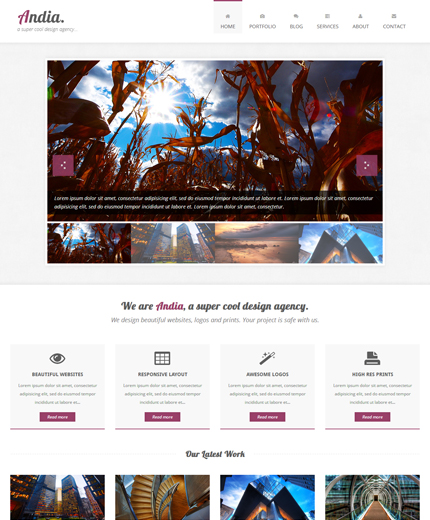
Andia: Responsive Agency/Portfolio Template

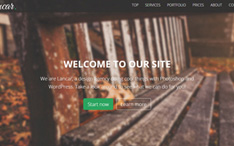
Today’s free web design resource is a big one! It’s a responsive agency/portfolio HTML template named Andia and built with Twitter Bootstrap. Andia comes with 5 fully responsive pages, Home, Portfolio, Services, About, Contact and it’s perfect for creating a website for a small business or a personal portfolio.

Some of Andia’s features include: responsive layout, responsive image slider, filterable portfolio, AJAX contact form, twitter feed, flickr photos, font awesome icons, google maps, etc. So, take a look at the live preview below, download the template and let me know what you think.

Features

  • Responsive Layout (Bootstrap 2.2.1)
  • 5 Pages: Home, Portfolio, Services, About, Contact
  • Responsive Image Slider (Flexslider)
  • Filterable Portfolio (jQuery Quicksand and PrettyPhoto)
  • AJAX Contact Form with Form Validation
  • Twitter Feeds
  • Latest Flickr Photos
  • Font Awesome Icons
  • Google Maps
  • Social Icons
  • HTML5 & CSS3

Demo, Download and License

VIEW DEMO

DOWNLOAD TEMPLATE: Andia - Responsive Agency/Portfolio Template (7237)

LICENSE:

You can use this template in personal and commercial projects, but you can’t sell or distribute it directly, “as is”. If you plan to use it, a link to this page or any form of spreading the word will be much appreciated.

Photos used in the live preview by:  Paul BicaShermeee, envato.

9 Comments to “Free HTML Template Andia: Responsive Agency/Portfolio Template built with Twitter Bootstrap”

  1. andy says:

    Hi there, I hope you can help me, I have adapted your theme Andia and its really working well, there are some questions that I would like you to help me with if possible. I love what you have done and I am learning a lot from the way you do things. Can you help me with the php mail form, at the moment I am not getting the NAME return, also I have added a PHONE field where SUBJECT used to be, that is now working but the phone is coming up as the subject of the email. What I would like is to be able to add other fields such as AREA, PRICE RANGE etc but now not even the NAME is being sent via email, I am just getting the EMAIL FROM , PHONE (subject) and MESSAGE. What am I doing wrong?

    Also in the testimonials area, there are two issues.

    1. how does it work on other pages where I want a different testimonial to be there? also can it cycle through them like the slideshow but for text?

    2.in responsive smaller views such as on an iPhone, the text in the testimonial goes to a very thin long column rather than wrapping around, can this be fixed?

    SLIDER
    1. If you also look at the slider in a small responsive viewer such as iPhone the left and right navigation arrows stay very big which looks odd.

    2. If you click on one of the thumbnails the slider jumps to the picture which is fine, but then the slideshow stops, could it be set so that when there is interaction it stops, even just hovering the cursor over the big picture, and then it carries on when interaction is over? that is how i have it set on another site i did here: http://www.fivestarluxuryclean.com but i cant see how to do it on your system.

    I would love to help you with feedback like this by the way, I think you have a great style so let me know if you want me to get through anything with suggestions.

    Regards
    Andy Reynolds

  2. Yasir Ali says:

    Hi Anil

    I like your theme, and I am interested to use this in my portfolio website. It’s really great design, but I am facing a problem only on my chrome browser, i.e. It view is stretched on Chrome, but working perfect on Firefox and Safari.

    This design is working fine on my friends Chrome browser as well. Could you please help me, how can I fix the design issue with my chrome.

    Thanks in advance.

  3. mark says:

    Hello, very nice! great work!
    I have only a question.
    How I can modify the map to use with another address?
    I don’t understand where is the address to modify.
    Thanks in advance.
    Best Regards,
    Mark

  4. Mark says:

    Hi Anli, I wrote one week ago but I don’t have no email.
    I think that there is a problem with my email.
    Sorry if rewrite.
    Your theme is beautifull, very nice and innovative.
    I have a question for you.
    How to change the address in the map?
    The question may be simple but I don’t understand how change the address to modify tha maps with another address.
    Please Anli, can you replay?
    Thanks a lot in advance.
    Best Regards,
    Mark

    • Anli says:

      Hi Mark, there is no problem with your email. If you see above, this template has more than 4000 downloads so, it’s difficult for me to reply to all questions immediately and also continue creating other freebies.
      Now, to answer to your question, open the “scripts.js” file (assets/js) and find this line:

      var position = new google.maps.LatLng(45.067883, 7.687231);

      Replace the 45.06.. and 7.68… with your coordinates. To get your coordinates make a quick google search: “how to get google maps coordinates”.

      • Mark says:

        Thanks a lot Anli!
        4000 download are a good satisfaction! very nice! great work!
        Sorry Anli but I use Chrome and I have same problems: I didn’t see my first comment in the page of your site.
        Thanks a lot!

  5. Abdul Ahkam says:

    Hey, I wanna use ur theme for donation website :)
    But, the web is still under developement. so, i just wanna say thank you, before i forgot ur website :D

    Thanks for this beautiful theme.

Leave a Reply

*

*