
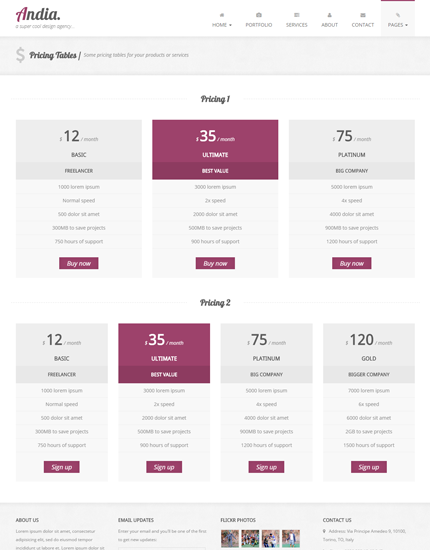
Today, it’s time to present you a new version of the Andia Bootstrap template, the version 2.1. In this update the most important changes are the use of the latest Bootstrap v3.3.4 and the addition of a new page with some Pricing Tables for your products and services.
Other updates include: the latest version of Font Awesome icons, a small change in the top menu and a bug fix in the portfolio page.
Below you can find a detailed changelog, some screenshots and the live preview and download links. Enjoy!
Want to Save this Article?
Preview and download
Download Andia version 2.1 from the template’s page.
ChangeLog
Latest version of Bootstrap and Font Awesome
In Andia v2.1 I’ve updated Bootstrap to its latest version 3.3.4 and Font Awesome icons to version 4.3.0.
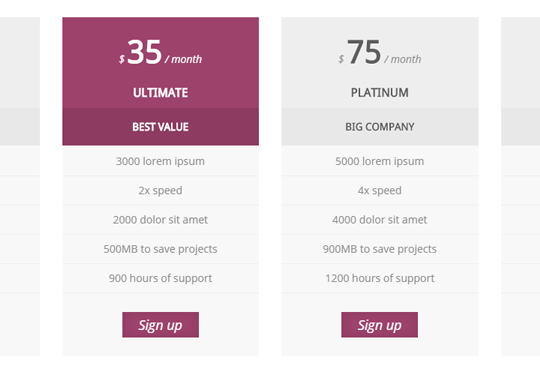
New page: Pricing Tables
In this version I’ve created a new page with some pricing tables that you can use to show the different prices of your products and services, as you can see in the image below:
Bug fix in the Portfolio page
Weeks ago some users have reported a bug in the Portfolio page: portfolio images were disappearing when viewed on the iPhone.
I’ve fixed this bug now, but let me know if it reappears or you find any other bug.
Small change in the top menu
I’ve removed the “Blog” in the top menu and added a new item called “Pages” that contains the link to the “Pricing Tables” page. I’ll also add here the links to the new pages in future versions.

Thank you for this template. Very simple and easy to work with.
Love the design and the flow of the elements.
By chance, have you designed a “to-top” button?
You’re welcome! Not yet, here is a template with a “to-top” button:
https://azmind.com/2015/01/10/lancar-bootstrap-one-page-agency-portfolio-free-template/
Hello Anli!
Thanks for this beautiful template!
I just updated to ver 2.1, how can i lightbox image in portfolio page? something different from ver 2.0?
Any help much appreciated. Thanks in advance!